Test Driven Development with Jest

Test Driven Development is a principle of software development that ensure your code work exactly as you want it, it is a principle that should be follow by every development although there are lot of people who are yet to follow the principle, But if you did not follow test driven development then you will follow debug later development.
Why you should follow Test Driven Development Principle
It makes debugging easier: Just imagine their is a bug or issue in your codebase with test driven development approach, your test cases will definitely fail and you will know exactly where to look, what to look for and what to modify. it makes development more easier.
It works the way you wanted it: Test Driven Development helps and ensure your code works exactly the way you want it.
Types of Test Driven Development
Unit Test
Unit test is a type of software development testing where individual/unit component of a software are tested. The process is done during the development of an application, to ensure and verify the correctness of a units/component of code.
Integration Test
Integration test is the process of testing collection/group of unit/component. Integration test is done upon completion of unit tests.
Acceptance/E2E(end to end) Test
End-to-end testing is a methodology used to test whether the flow of an application is performing as designed from start to finish. The purpose of carrying out end-to-end tests is to identify system dependencies and to ensure that the right information is passed between various system components and systems.
Test Driven Development Cycle
There are 3 cycle behind test Driven Development,Red, Green and Refactor just like there are 3 cycle behind traffic light control red, yellow and green.
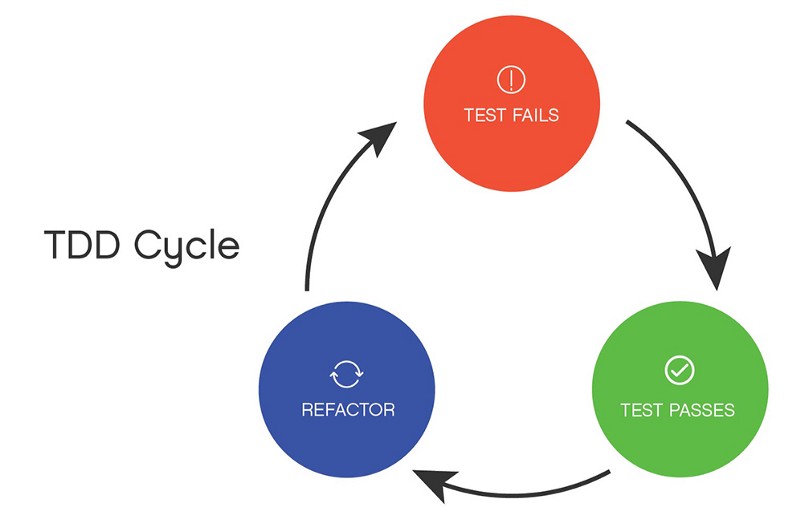
Red: write a test and it fail
Green: write a test for a functionality and make sure it pass the test
Refactor: Optimizing the previous passed test and make sure all test cases pass.
What is Jest?
Jest is a delightful JavaScript Testing Framework with a focus on simplicity. It works with projects using: Babel, TypeScript, Node, React, Angular, Vue and more!
How to install jest in your Javascript Project
using yarn you install jest with below code
yarn add --dev jest
using npm you can install jest with below code
npm install --save-dev jest
TDD keyword you should know in Jest
expect: When you're writing tests, you often need to check that the values met certain conditions. expect gives you access to a number of "matchers" that let you validate different things. expect accept a value(a value you want to check against what you are expecting).
E.g
expect(sum(1,2)).toBe(3);
expect(sum(1,2)).toBeA(number);
expect(sum(1,2).toEqual(3);
expect function has some matcher you can use and chain with in jest. such as .toBe() , toBeA , toEqual ,toContainEqual e.t.c. check the official documentation for more expect matchers.
test/it: test or it is a function that run the test, it allows you to test your unit function For Example. Let Say there is a function called sum that accept two parameter and return the addition of the parameters.
test('Sum of two numbers', () => {
 expect(Sum(5,9)).toBe(14); }
);
check the official documentation for matcher.
How to get started with Jest using Javascript
initialize javascript project with npm using your terminal
npm init --y
install jest into your project using terminal
npm install --save-dev jest
NB: You can create your test file with .test.js extension which will allows jest to locate your file and run your test cases. To organise and structure your project you can create a folder with the name test in your project directory which will house all test cases file.
Example
Let assume you are given a task to write a function that will accept two values as a parameter and sum the two values. the question now is what should you test for. There are lot of things to test for all you need to do is to think about what kind of output/result you want to return to the user. Below are what you can test for.
Test if the parameters value is number data type, if it is not a number then the test should fail.
Test if the sum of parameter a and parameter b is logically correct, if not the test should fail.
NB: If you want your parameter should accept array and also sum the array. you can write a test case that check if the user supply array as a parameter and check if it does return correct answer.
Solution
There are two way to TDD either you write your test cases first before you actually start your development or write test cases later after development but the best practice is test case first then development. that's the approach we are going to follow now.
Let create a folder called test in root level of our project, inside the folder create a file called sum.test.js, all our test cases for sum function will be in the file.
NB: I will be using commonJS, you can use and configure your project to use babel, if it's already configured with babel so all is good
//import sum
const { sum } = require("./sum");
describe('Addition of Two Number functionality test',()=>{
test("Add 1 + 2 should be 3", () => {
expect(sum(1, 2)).toBe(3);
expect(sum(1,2)).toBeA(number);
});
test("it should fail if string as parameter", () => {
expect(sum("Hello", "World"))
.toEqual(Error("Expecting number type as parameter"));
});
});
Explanation
First test case will check if first parameter and second parameter value return correct answer. i.e if 1+2 equal to 3.
test("Add 1+2 should be 3", () => {
expect(sum(1, 2)).toBe(3);
});
Second test case will check if first parameter or second parameter value is string and return error.
test("it should fail if string as parameter", () => {
expect(sum("Hello", "World"))
.toEqual(Error("Expecting number type as parameter"));
Now that our test cases has been written, we only need to make sure that our sum function pass all the test cases. Let create a file called sum.js in the root folder, the file will contain a function that accept two number and sum the two numbers
const sum = (a, b) => {
if (typeof a !== "number" || typeof b !== "number")
return Error("Expecting number type as parameter");
return a + b;
};
module.exports = { sum };
NB: the above snippet first check the data type of the parameter if it is not number it should return an error with the message Expecting number type as parameter What next now is to run our test, before then we need to configure our project to work with jest, let go directly to package.json file and add "test": "jest" to the script section. our script should look something related to the below code.
"scripts": {
 "test": "jest"
},
we can now run our test with npm test or yarn test command, below is the result/output of our test
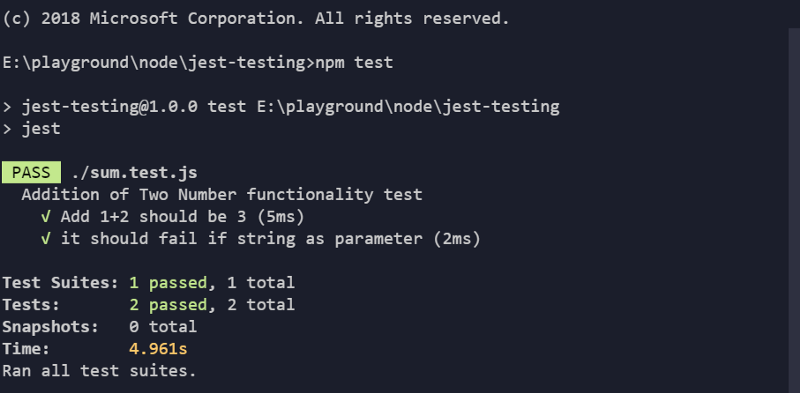
Okay, let me show one of test cases i wrote for login, there are many ways of test cases, all you need to do is to think about what you want to check for.
describe("Login Module for test cases", () => {
it("should return the user if the name is valid", function(done) {
request(app)
.post("/login")
.send({ username: "DAMMAK", password: "Adedamola" })
.end(function(err, res) {
expect(res.statusCode).toEqual(200);
expect(res.text).toEqual(
JSON.stringify({ username: "DAMMAK", password: "Adedamola" })
);
done();
});
});
it("fails if login details is wrong", function(done) {
request(app)
.post("/login")
.send({ username: "wrongUser", password: "wrongPass" })
.end(function(err, res) {
expect(res.statusCode).toEqual(400);
done();
});
});
it("fails if empty request data was sent", function(done) {
request(app)
.post("/login")
.send({})
.end(function(err, res) {
expect(res.statusCode).toEqual(400);
done();
});
});
});
About the author
I am a full stack developer from Lagos, Nigeria. I am passionate about web development and ecosystem. I love learning, building and exploring tools.
Comments
Join the discussionNo comments yet. Be the first to comment.


